Payment Receipt
KisPay provides a comprehensive receipt system that allows users to view detailed payment information and transaction receipts through a simple URL redirect. This feature enables both merchants and customers to access professional payment receipts for record-keeping and verification purposes.
Receipt URL Format
After a successful payment, users can access their payment receipt using the following URL format:
https://checkout.kispay.et/#/receipt/{transaction_reference}https://checkout.kispay.et/#/receipt/d931b2a7-323c-49c3-bb1b-2de95bfe2543Receipt Information
The KisPay receipt page displays comprehensive payment details including:
Payment Details
- Transaction Reference ID: Unique transaction identifier (e.g.,
d931b2a7-323c-49c3-bb1b-2de95bfe2543) - Session ID: Checkout session identifier
- Order Number: Merchant’s custom order reference
- Payer Name: Customer’s full name
- Phone Number: Customer’s phone number
- Email Address: Customer’s email address
- Payment Method: Method used for payment (e.g., TeleBirr, CBE Birr, Awash Birr)
- Status: Payment status (e.g., COMPLETED, FAILED)
- Payment Date: Date and time of the transaction
- Description: Purpose or description of the payment
Financial Information
- Amount: Payment amount in ETB
- Currency: ETB (Ethiopian Birr)
- Transaction Fee: Processing fee (if applicable)
- Total Amount: Final amount charged
Merchant Information
- Merchant Name: Business or service provider name
- Business Email: Merchant’s registered email
- Phone Number: Merchant contact number
- Address: Merchant business address (City, Country)
- TIN: Tax Identification Number (if available)
Transaction References
- KisPay Reference: Internal KisPay transaction reference ID
- Merchant Reference: Your custom transaction or order reference
- Bank Reference: Bank or payment provider transaction reference
Implementation
Redirect After Payment
You can redirect users to the receipt page after a successful payment. Here’s how to implement it:
For Redirect Checkout:
// After successful payment verification
async function handleSuccessfulPayment(sessionId) {
  try {
    const statusResponse = await fetch(`/api/verify-status?sessionId=${sessionId}`);
    const statusData = await statusResponse.json();

    if (statusData.status === "COMPLETED") {
      // Get transaction reference from response
      const transactionRef = statusData.transactionId || sessionId;

      // Redirect to receipt page
      const receiptUrl = `https://checkout.kispay.et/#/receipt/${transactionRef}`;
      window.location.href = receiptUrl;
    }
  } catch (error) {
    console.error("Error fetching payment status:", error);
  }
}
For Direct Checkout:
// After event-based status check confirms success
const checkPaymentStatusEvent = async (sessionId, paymentMethod, phone) => {
  try {
    const response = await fetch(`/api/check-status-event`, {
      method: "POST",
      headers: { "Content-Type": "application/json" },
      body: JSON.stringify({
        sessionId,
        paymentMethod,
        phone,
      }),
    });
    const data = await response.json();

    if (data.status === "SUCCESS") {
      // Get transaction reference
      const transactionRef = data.transactionId || data.sessionId;

      // Redirect to receipt page
      const receiptUrl = `https://checkout.kispay.et/#/receipt/${transactionRef}`;

      // Show success message before redirect
      handleSnackOpen("Payment completed successfully!", "success");
      setTimeout(() => {
        window.location.href = receiptUrl;
      }, 2000);
    }
  } catch (error) {
    console.error("Status check error:", error);
  }
};
Backend Implementation
You can also generate receipt URLs on your backend and return them to the frontend:
app.get("/api/get-receipt-url", async (req, res) => {
  const { sessionId } = req.query;

  if (!sessionId) {
    return res.status(400).json({ error: "Session ID required" });
  }

  try {
    // Verify payment status
    const statusData = await checkPaymentStatus(sessionId);

    if (statusData.status === "SUCCESS" || statusData.status === "COMPLETED") {
      // Generate receipt URL
      const transactionRef = statusData.transactionId || sessionId;
      const receiptUrl = `https://checkout.kispay.et/#/receipt/${transactionRef}`;

      res.json({
        success: true,
        receiptUrl: receiptUrl,
        transactionRef: transactionRef,
        status: statusData.status,
      });
    } else {
      res.status(400).json({
        success: false,
        message: "Payment not completed",
        status: statusData.status,
      });
    }
  } catch (error) {
    res.status(500).json({
      error: "Failed to generate receipt URL",
      message: error.message,
    });
  }
});
Receipt Features
Print Receipt
Users can print the receipt for their records using the browser’s built-in print function:
- Click the “Print Receipt” button on the receipt page
- Or use the browser’s print shortcut (
Ctrl+Pon Windows/Linux,Cmd+Pon Mac) - The receipt is optimized for printing on standard A4/Letter paper
Download Receipt
The receipt page provides options to download the receipt in various formats:
- PDF: For easy sharing and archiving
- Image: For quick visual reference
- Downloads include all transaction details and merchant information
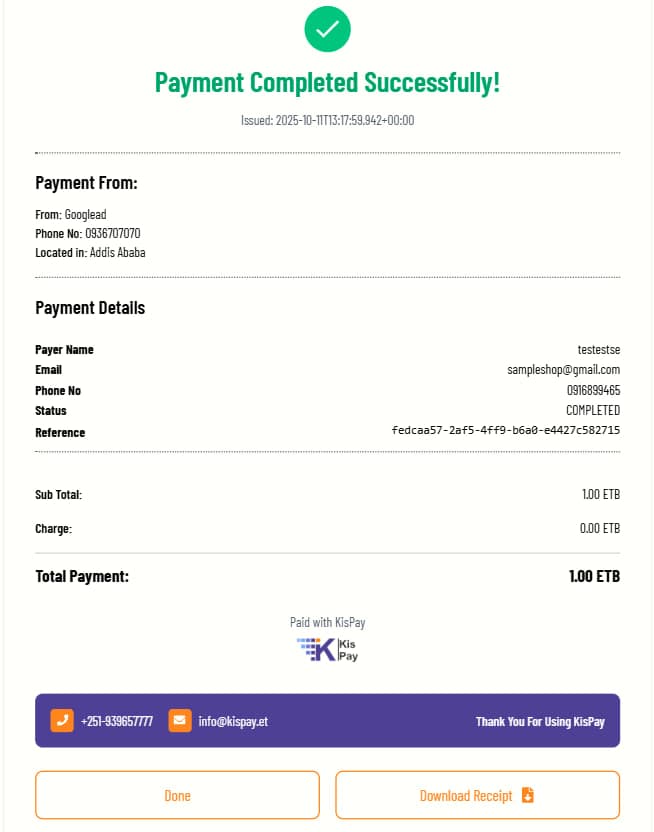
Example Receipt
Here’s what a typical KisPay payment receipt looks like:
Use Cases
For Merchants
- Record Keeping: Maintain comprehensive transaction records
- Customer Service: Quickly verify payment details when customers inquire
- Accounting: Simplify reconciliation and financial reporting
- Compliance: Meet tax and audit requirements
- Dispute Resolution: Provide proof of transaction for dispute resolution
For Customers
- Payment Proof: Immediate proof of payment for purchases
- Record Management: Easy access to transaction history
- Expense Tracking: Track business or personal expenses
- Tax Documentation: Collect receipts for tax purposes
Email Receipt Integration
You can also send receipts automatically via email after successful payments:
const nodemailer = require("nodemailer");

async function sendReceiptEmail(sessionId, customerEmail) {
  try {
    // Get transaction data
    const statusData = await checkPaymentStatus(sessionId);

    if (statusData.status === "SUCCESS" || statusData.status === "COMPLETED") {
      const transactionRef = statusData.transactionId || sessionId;
      const receiptUrl = `https://checkout.kispay.et/#/receipt/${transactionRef}`;

      // Configure email transporter
      const transporter = nodemailer.createTransport({
        // Your email configuration
        service: "gmail",
        auth: {
          user: process.env.EMAIL_USER,
          pass: process.env.EMAIL_PASS,
        },
      });

      // Email content
      const mailOptions = {
        from: "noreply@kispay.et",
        to: customerEmail,
        subject: "Payment Receipt - KisPay",
        html: `
          <h2>Thank you for your payment!</h2>
          <p>Your payment has been successfully processed.</p>
          <p><strong>Transaction Reference:</strong> ${transactionRef}</p>
          <p><strong>Amount:</strong> ${statusData.amount} ETB</p>
          <p>You can view and download your receipt here:</p>
          <a href="${receiptUrl}" style="display: inline-block; padding: 10px 20px; background-color: #3E4095; color: white; text-decoration: none; border-radius: 5px;">View Receipt</a>
          <p style="margin-top: 20px; font-size: 12px; color: #666;">
            If you have any questions, please contact us at support@kispay.et
          </p>
        `,
      };

      // Send email
      await transporter.sendMail(mailOptions);
      console.log(`Receipt email sent to ${customerEmail}`);

      return { success: true, receiptUrl };
    }
  } catch (error) {
    console.error("Error sending receipt email:", error);
    return { success: false, error: error.message };
  }
}

// Use after payment verification
app.post("/api/send-receipt", async (req, res) => {
  const { sessionId, customerEmail } = req.body;

  if (!sessionId || !customerEmail) {
    return res.status(400).json({ error: "Session ID and email required" });
  }

  const result = await sendReceiptEmail(sessionId, customerEmail);
  res.json(result);
});
Support
For any issues with receipt access or questions about receipt information:
- General Support: support@kispay.et
- Developer Support: developers@kispay.et
- Merchant Portal: https://merchant.kispay.et
- Website: https://kispay.et