Redirect Checkout Flow
Redirect Checkout Flow is a simple and efficient integration method where customers are redirected from your website or application to a KisPay-hosted checkout page to complete their payment. After payment, they are redirected back to your site, and you receive updates via webhooks or callback URLs. Below are the detailed steps from beginning to end, using the working sample as a practical example.
Step 1: Obtain and Secure Your API Key
-
Description: Begin by obtaining your API key from the KisPay Merchant Dashboard (e.g., KPG_PROD-xxxxx here for production or a test key like KPG_TEST-xxxx for testing). Securely store this key to prevent exposure.
-
Action: Create an environment file to store the key and configure your server.
-
Example: Create a .env file in your project root:
env fileecho "KISPAY_API_KEY=kp_live_your_api_key_here" > .env echo "KISPAY_API_BASE_URL=https://api.kispay.et/api" >> .env echo ".env" >> .gitignore``` -
Ensure your server loads this environment variable (e.g., using a library like dotenv in Node.js).
Step 2: Set Up Your Server Environment
- Description: Configure your backend server to handle API requests and webhook notifications. Ensure it uses HTTPS with a valid SSL/TLS certificate, as required by KisPay.
- Action: Set up a basic server with the necessary dependencies and endpoints.
- Example: (Node.js with Express):
const express = require('express');
const axios = require('axios');
require('dotenv').config();

const app = express();
app.use(express.json());

const API_KEY = process.env.KISPAY_API_KEY;
const API_BASE_URL = process.env.KISPAY_API_BASE_URL;

app.listen(3000, () => console.log('Server running on port 3000'));```
Step 3: Create a Checkout Session (Backend)
When a customer initiates a payment (e.g., clicks “Checkout” on your site), your backend creates a checkout session by calling the KisPay API. This session stores payment details and generates a URL for the customer to complete the payment.
- Action: Implement an endpoint to create the session and return the checkout URL.
- Endpoint: POST /checkout/create_session
- Required Fields: amount, orderNo, description, phone, email, fullName, successUrl, cancelUrl, errorUrl, redirectUrl
{
  "amount": 44000,
  "orderNo": "0045",
  "description": "samsung",
  "phone": "0941420279",
  "email": "merchant@gmail.com",
  "fullName": "Test",
  "redirectUrl": "http://www.google.com?e=1231/redirect",
  "errorUrl": "http://www.google.com?e=1231/error",
  "cancelUrl": "http://www.google.com?e=1231/cancel",
  "successUrl": "http://www.google.com?e=1231/success"
}```- Implementation (Node.js):
async function createSession(data) {
  const response = await axios.post(`${API_BASE_URL}/checkout/create_session`, data, {
    headers: {
      Authorization: `Bearer ${API_KEY}`,
      "Content-Type": "application/json",
    },
  });
  return response.data.body;
}

app.post("/api/create-session", async (req, res) => {
  const sessionData = req.body;
  try {
    const session = await createSession(sessionData);
    res.json(session);
  } catch (error) {
    res.status(500).json({ error: "Failed to create session" });
  }
});- Response (Based on Provided Example):
{
  "statusCode": 201,
  "message": "Checkout session created successfully",
  "body": {
    "id": "fc0ece00-73b5-4ced-b0d1-42b729c55882",
    "merchantId": "68c1a71c-ace8-419a-b548-1ccaba414219",
    "merchantBusinessName": "Googlead",
    "merchantBusinessTelephone": "0936707070",
    "merchantBusinessAddressCity": "Addis Ababa",
    "MerchantBusinessEmail": "abe@gmail.com",
    "amount": "44,000.00",
    "currency": "ETB",
    "orderNo": "0045",
    "description": "samsung",
    "fullName": "Test",
    "phone": "0941420279",
    "email": "merchant@gmail.com",
    "successUrl": "http://www.google.com?e=1231/success",
    "cancelUrl": "http://www.google.com?e=1231/cancel",
    "errorUrl": "http://www.google.com?e=1231/error",
    "redirectUrl": "http://www.google.com?e=1231/redirect",
    "paymentUrl": "https://checkout.kispay.et/#/checkout-test/fc0ece00-73b5-4ced-b0d1-42b729c55882",
    "status": "PENDING",
    "createdAt": "2025-10-22T18:31:13.286+00:00"
  },
  "timestamp": "2025-10-22T18:31:13.292+00:00"
}```- Key Fields in Response:
- id: Unique session ID (e.g., fc0ece00-73b5-4ced-b0d1-42b729c55882).
- paymentUrl: The URL to redirect the customer (e.g., https://checkout.kispay.et/#/checkout-test/ …).
- status: Initial state is PENDING
Step 4: Redirect Customer to KisPay Checkout Page (Frontend)
- Redirect the customer to the checkoutUrl after session creation.
async function initiateCheckout() {
  const response = await fetch("/api/create-session", {
    method: "POST",
    headers: { "Content-Type": "application/json" },
    body: JSON.stringify({
      amount: 44000,
      orderNo: "0045",
      description: "samsung",
      phone: "0941420279",
      email: "merchant@gmail.com",
      fullName: "Test",
      redirectUrl: "https://www.google.com?e=1231/redirect",
      errorUrl: "https://www.google.com?e=1231/error",
      cancelUrl: "https://www.google.com?e=1231/cancel",
      successUrl: "https://www.google.com?e=1231/success",
    }),
  });
  const { paymentUrl } = await response.json();
  window.location.href = paymentUrl; // Redirect to KisPay checkout
}

document.getElementById("checkoutButton").addEventListener("click", initiateCheckout);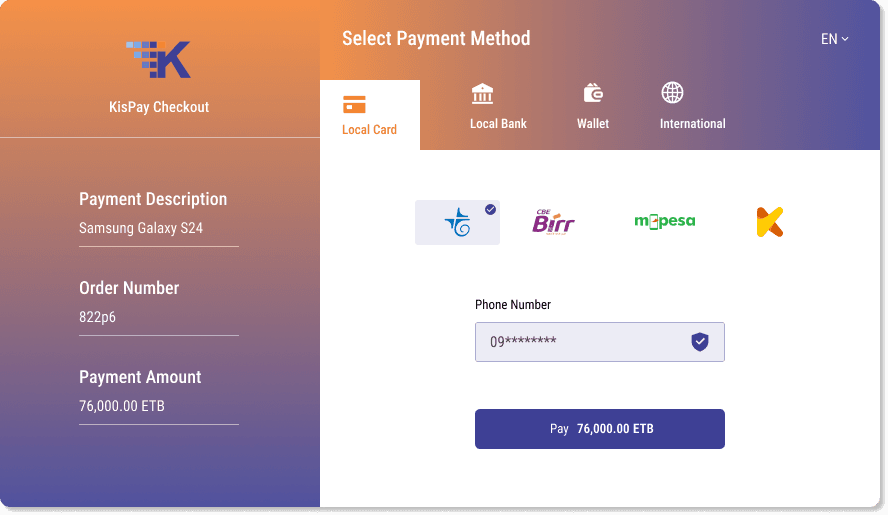
Step 5: Customer Completes Payment on KisPay Checkout Page
- Description: The customer selects a payment method (e.g., TeleBirr with phone 0941420279) and completes the payment on the KisPay page.
- Example: Enters a test PIN (e.g., 1111) via a push notification to confirm.
- Status: Transitions from PENDING to PROCESSING, then to COMPLETED, FAILED, CANCELLED, or EXPIRED.
Step 6: Verify Transaction Status
After the customer completes the payment, the merchant system verifies the transaction status using one of two endpoints:
/api/checkout/hooks/status/{sessionId}for a direct status check or/api/payments/statusfor an event-based status retrieval.
The chosen method determines the final payment status, which is used to prepare the appropriate redirect.
- Endpoints:
Option 1: GET /api/checkout/hooks/status/{sessionId}
- A direct GET request to retrieve the current transaction status. -
- Sample Request:
- URL:
https://api.kispay.et/api/checkout/hooks/status/fc0ece00-73b5-4ced-b0d1-42b729c55882 - Headers: Authorization: Bearer
${API_KEY}
- URL:
Expected Response:
{
  "statusCode": 200,
  "message": "Checkout status",
  "body": "COMPLETED",
  "timestamp": "2025-10-23T12:31:46.343+00:00"
}
Option 2: POST /api/payments/status (Event-Based)
An event-driven approach where the merchant sends a POST request with the session ID to retrieve the status by using the event link logic from your component.
After the payment request is initiated, the KisPay payment gateway monitors the transaction status. Once the payment status changes on the KisPay side (e.g., success, failed, or pending), the updated status is sent back to the merchant system through the event model.
The merchant system continues to periodically check or listen for the payment status update until a final response is received from KisPay. Once the final status is received, the connection between the merchant and KisPay is closed.
{
  "sessionId": "fc0ece00-73b5-4ced-b0d1-42b729c55882"
  "paymentMethod":"telebirr",
  "phone":"09XXXXXXXXX"
}{
"sessionId": "fc0ece00-73b5-4ced-b0d1-42b729c55882"
"status":"SUCCESS"
"message":"Process service request successfully"
}- Implement an endpoint to query the status using either method and process the result.
const axios = require('axios');
async function getTransactionStatus(sessionId, useEvent = false) {
  if (useEvent) {
    // Event-based approach (POST /api/payments/status)
    const url = `${API_BASE_URL}/payments/status`;
    const response = await axios.post(url, { sessionId }, {
      headers: { 'Authorization': `Bearer ${API_KEY}`, 'Content-Type': 'application/json' },
    });
    return response.data.body;
  } else {
    // Direct approach (GET /api/checkout/hooks/status/{sessionId})
    const url = `${API_BASE_URL}/checkout/hooks/status/${sessionId}`;
    const response = await axios.get(url, {
      headers: { 'Authorization': `Bearer ${API_KEY}` },
    });
    return response.data.body;
  }
}

app.get('/api/verify-status', async (req, res) => {
  const { sessionId, method = 'direct' } = req.query; // 'direct' for hooks, 'event' for payments/status
  if (!sessionId) return res.status(400).json({ error: 'Session ID required' });
  try {
    const statusData = await getTransactionStatus(sessionId, method === 'event');
    if (statusData.status === 'COMPLETED') {
      console.log(`Order ${sessionId} completed with transaction ${statusData.transactionId}`);
      // Update database, send email to merchant@gmail.com, fulfill order
    } else if (['FAILED', 'CANCELLED', 'EXPIRED'].includes(statusData.status)) {
      console.log(`Order ${sessionId} ${statusData.status.toLowerCase()}`);
      // Notify customer, log issue
    }
    res.json(statusData);
  } catch (error) {
    res.status(500).json({ error: 'Failed to verify status' });
  }
});
Step 7: Handle Redirects After Payment
Based on the verified transaction status, the merchant system redirects the customer to the appropriate URL (successUrl, errorUrl, or cancelUrl) as defined in the checkout session.
-
Example:
- Success: Redirects to https://www.google.com?e=1231/success .
- Error: Redirects to https://www.google.com?e=1231/error .
- Cancel: Redirects to https://www.google.com?e=1231/cancel .
- Sample Success Page:
-
Sample Redirect Handler
app.get("/api/redirect-after-payment", async (req, res) => {
  const { sessionId, method = "direct" } = req.query;
  if (!sessionId) return res.status(400).send("Session ID required");
  try {
    const statusData = await getTransactionStatus(sessionId, method === "event");
    let redirectUrl;
    switch (statusData.status) {
      case "COMPLETED":
        redirectUrl = "http://www.google.com?e=1231/success";
        break;
      case "FAILED":
        redirectUrl = "http://www.google.com?e=1231/error";
        break;
      case "CANCELLED":
      case "EXPIRED":
        redirectUrl = "http://www.google.com?e=1231/cancel";
        break;
      default:
        redirectUrl = "http://www.google.com?e=1231/error";
    }
    res.redirect(redirectUrl);
  } catch (error) {
    res.redirect("http://www.google.com?e=1231/error");
  }
});

// Frontend trigger (if needed, though backend redirect is preferred)
window.location.href = `/api/redirect-after-payment?sessionId=fc0ece00-73b5-4ced-b0d1-42b729c55882&method=direct`;<h1>Payment Successful!</h1>
<p>Order #0040 for Samsung (44,000 ETB) is confirmed.</p>Step 8: Test the Entire Flow
{
  "url": "https://api.kispay.et/api/checkout/create_session",
  "method": "POST",
  "headers": {
    "Authorization": "Bearer YOUR_TEST_API_KEY",
    "Content-Type": "application/json"
  },
  "body": {
    "amount": 44000,
    "orderNo": "0045",
    "description": "samsung",
    "phone": "0941420279",
    "email": "merchant@gmail.com",
    "fullName": "Test",
    "redirectUrl": "http://www.google.com?e=1231/redirect",
    "errorUrl": "http://www.google.com?e=1231/error",
    "cancelUrl": "http://www.google.com?e=1231/cancel",
    "successUrl": "http://www.google.com?e=1231/success"
  }
}
Step 9: Go Live and Monitor Your Transaction
Replace the test API key with Production API key, and monitor at https://merchant.kispay.et