KisPay Webhook Integration Guide
1. Introduction
KisPay webhooks deliver real-time notifications about checkout and payment events so your systems can react without polling. This guide explains how to configure endpoints, verify signatures, consume events, and monitor delivery health.
2. Webhook System Overview
KisPay’s webhook platform consists of:
- Webhook Events: Records of lifecycle changes in checkout and payment flows.
- Webhook Payloads: JSON payloads delivered to your HTTPS endpoint.
- Signature Verification: HMAC-SHA256 signatures guarded by your webhook secret.
- Retry Engine: Automatic retries with exponential backoff.
- Management API: Endpoints to audit, resend, and analyse webhook activity.
3. Available Event Types
The following event types are currently emitted:
checkout.completedcheckout.failedcheckout.canceledpayment.succeeded
Use the event and event_id fields to branch logic and deduplicate deliveries.
4. Setting Up Your Webhook Endpoint
To start receiving webhooks:
- Deploy an HTTPS endpoint that accepts POST requests.
- Register the URL inside the KisPay Merchant Dashboard.
- Read the raw request body to perform signature verification.
- Respond with HTTP 2xx within 3 seconds to acknowledge delivery.
Your endpoint should:
- Validate signatures before processing.
- Handle duplicate deliveries idempotently using
event_id. - Log inbound requests and responses for support and audit.
- Return non-2xx only when you need KisPay to retry.
Merchant Dashboard Configuration
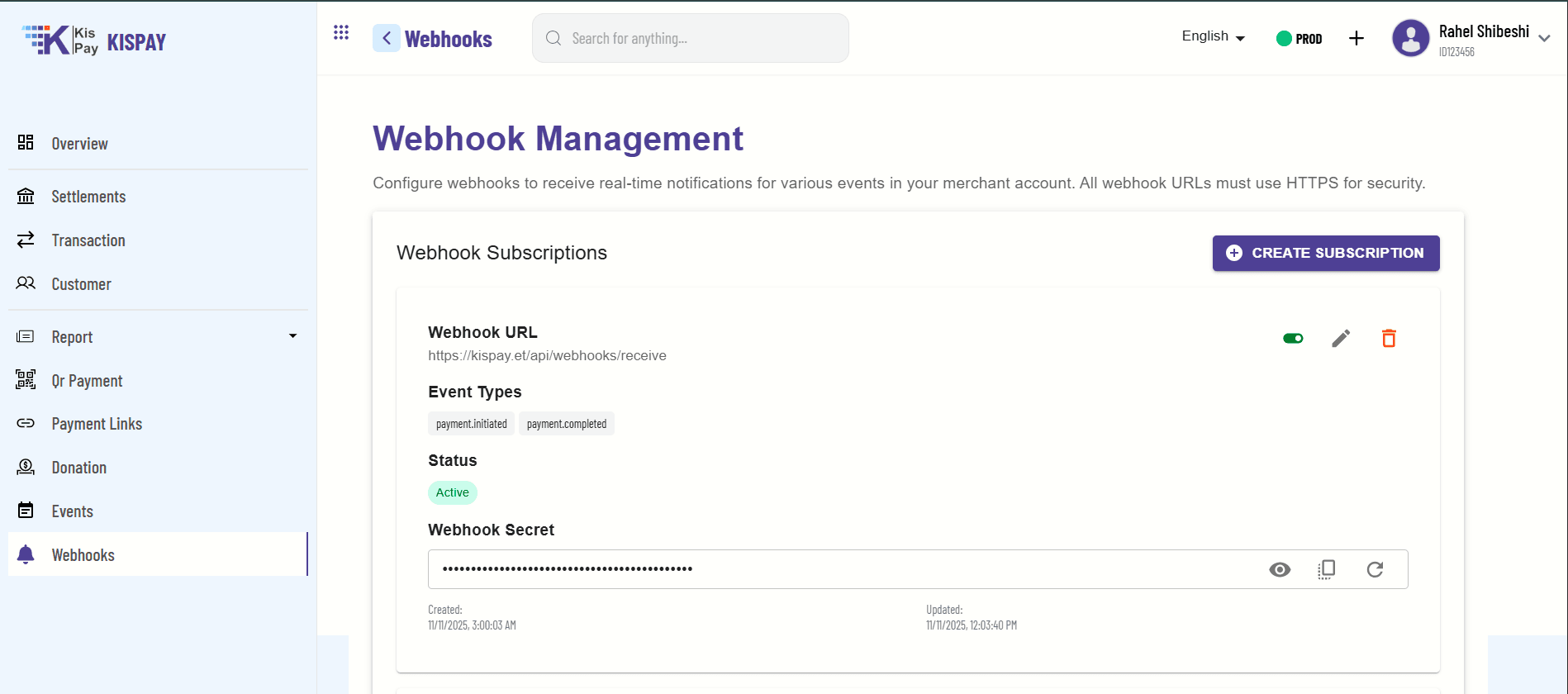
Use the Webhooks section in the merchant portal to create or update subscriptions, select event types, rotate secrets, and monitor their status.
Creating a New Subscription
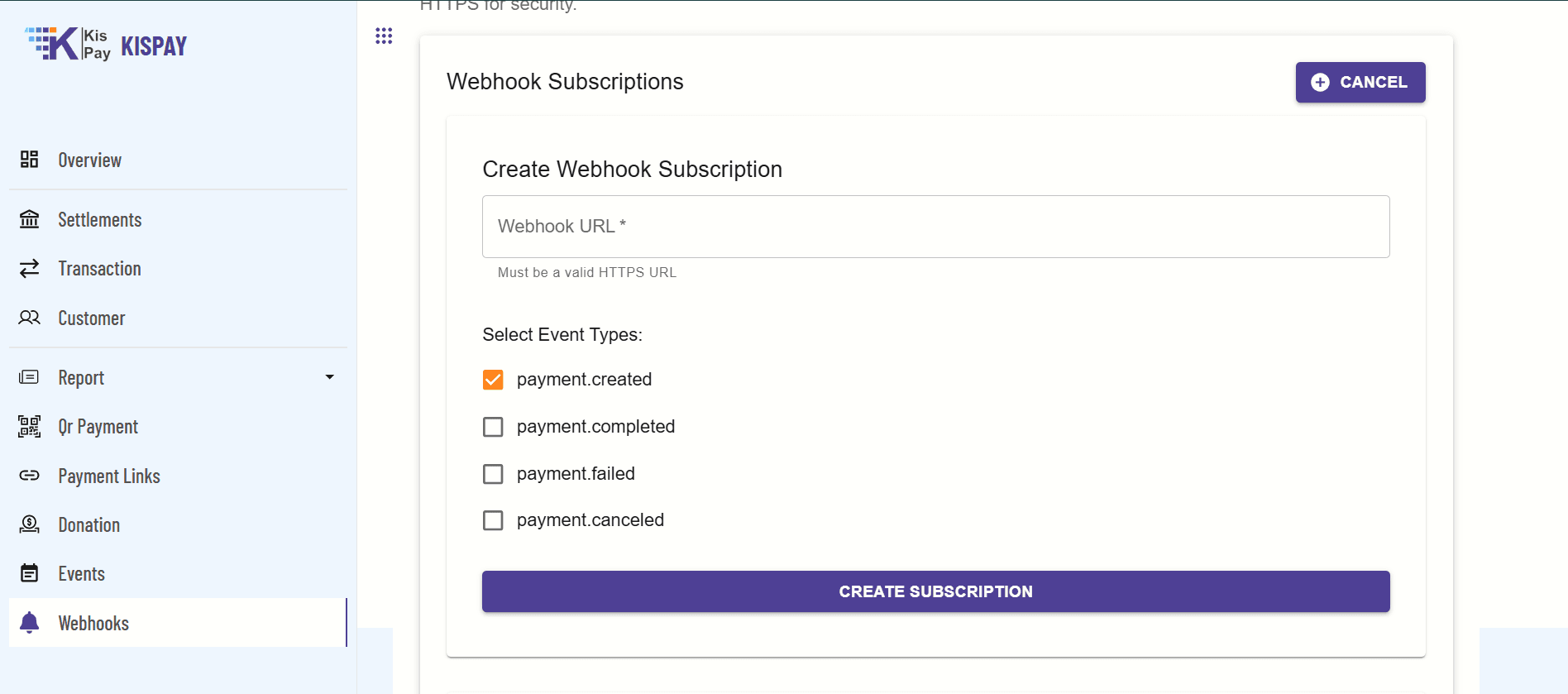
When you click Create Subscription, provide the target HTTPS URL and select the events you want to receive. At minimum, include lifecycle events such as payment.created and payment.completed so you capture both initiation and completion notifications.
5. Webhook Payload Structure
Sample payload:
{
  "event": "event_type",
  "event_id": "evt_1234567890abcdef",
  "api_version": "v1.0",
  "created_at": "2023-01-01T12:00:00",
  "data": {
    // Event-specific data
  },
  "signature": "sha256=base64_encoded_signature"
}
Field Reference
| Field | Description |
|---|---|
event | Event type identifier (for example, checkout.completed). |
event_id | Unique ID used for idempotency and troubleshooting. |
api_version | API version associated with the event payload. |
created_at | ISO-8601 timestamp when KisPay generated the event. |
data | Event-specific payload (object structure varies per event type). |
signature | HMAC-SHA256 signature (base64) used to verify authenticity. |
6. Signature Verification
Always verify the X-KisPay-Signature header using your webhook secret:
- Extract the signature from the header.
- Generate an HMAC-SHA256 hash of the raw request body using your webhook secret.
- Base64-encode the hash and compare with the signature using a constant-time comparison.
Javascript Example
const crypto = require("crypto");

app.post("/webhook", express.raw({ type: "application/json" }), (req, res) => {
  const signature = req.headers["x-kispay-signature"];
  const eventId = req.headers["x-kispay-event-id"];
  const payload = req.body.toString();

  if (!signature || !eventId) {
    return res.status(400).json({ error: "Missing headers" });
  }

  const expected = crypto.createHmac("sha256", process.env.KISPAY_WEBHOOK_SECRET).update(payload).digest("hex");

  if (!crypto.timingSafeEqual(Buffer.from(expected), Buffer.from(signature))) {
    return res.status(401).json({ error: "Invalid signature" });
  }

  const data = JSON.parse(payload);
  handleWebhook(data);
  res.json({ status: "success" });
});
7. Error Handling and Retry Strategy
KisPay retries failed deliveries automatically using exponential backoff:
| Attempt | Delay After Previous Failure |
|---|---|
| 1st | 1 minute |
| 2nd | 5 minutes |
| 3rd | 30 minutes |
| 4th | 2 hours |
| 5th | 12 hours |
Retries are triggered when:
- Your endpoint returns a non-2xx status code.
- The request times out (> 3 seconds).
- Network or connectivity errors occur.
After five failed attempts the event is marked FAILED and moved to a dead-letter queue for manual review.
8. Webhook Management API
Use these APIs to inspect and manage webhook activity (base URL: https://api.kispay.et ):
List Webhook Events
GET /api/checkout/webhooks/eventsQuery parameters: status, merchantId, startDate, endDate, page, pageSize
Get Webhook Event Logs
GET /api/checkout/webhooks/events/{eventId}/logsResend Failed Webhook
POST /api/checkout/webhooks/events/{eventId}/resendGet Webhook Statistics
GET /api/checkout/webhooks/statsQuery parameters: merchantId, startDate, endDate
9. Checkout Hooks
For immediate session checks you can also call:
POST /api/checkout/hooks/success/{sessionId}POST /api/checkout/hooks/error/{sessionId}POST /api/checkout/hooks/cancel/{sessionId}GET /api/checkout/hooks/status/{sessionId}
Combine checkout hooks with webhooks for redundancy and faster merchant-facing updates.
10. Best Practices
- Use HTTPS: Always serve webhook endpoints over TLS.
- Validate Signatures: Block processing until signature verification succeeds.
- Handle Duplicates: Use
event_idfor idempotency. - Respond Quickly: Offload heavy work to background jobs; acknowledge first.
- Log Everything: Capture headers, payloads, and responses for traceability.
- Monitor Delivery: Review statistics and dead-letter queues frequently.
11. Troubleshooting
Webhook Not Delivered
- Confirm your endpoint is publicly reachable and supports HTTPS.
- Check server capacity, firewall, and reverse proxy configuration.
- Inspect the event in the Webhook Management API for status and retries.
Signature Verification Failing
- Verify the correct webhook secret is used for the environment.
- Ensure the raw body is hashed before parsing or modification.
- Check that the signature comparison is constant-time and base64 encoded.
Timeouts and Slow Responses
- Keep processing under 3 seconds; queue heavy work asynchronously.
- Scale the endpoint horizontally if you receive bursts of events.
- Cache configuration settings locally to prevent slow downstream calls.
Dead Letter Queue (DLQ)
- Investigate root cause using
/events/{eventId}/logs. - Fix endpoint issues, then call the resend API to re-trigger delivery.
- Contact KisPay support if retries continue to fail after remediation.
12. Support
For webhook-specific assistance provide the event_id, timestamp, and response details when contacting support.
- General Support: support@kispay.et
- Developer Support: developers@kispay.et
- Merchant Portal: https://merchant.kispay.et