Transaction Management
KisPay provides comprehensive transaction management tools that allow merchants to view, filter, and track all payment transactions. You can access transaction data through both the KisPay Merchant Portal and the Transaction API.
Access Methods
| Method | Description | Best For |
|---|---|---|
| Merchant Portal | Web-based dashboard with visual interface | Manual review, reporting, customer support |
| Transaction API | Programmatic access to transaction data | Automated systems, integration, analytics |
Viewing Transactions via Merchant Portal
The KisPay Merchant Portal provides a user-friendly interface to view and manage all your transactions.
Accessing the Portal
- Navigate to https://merchant.kispay.et
- Log in with your merchant credentials
- Click on “Transaction” in the sidebar menu
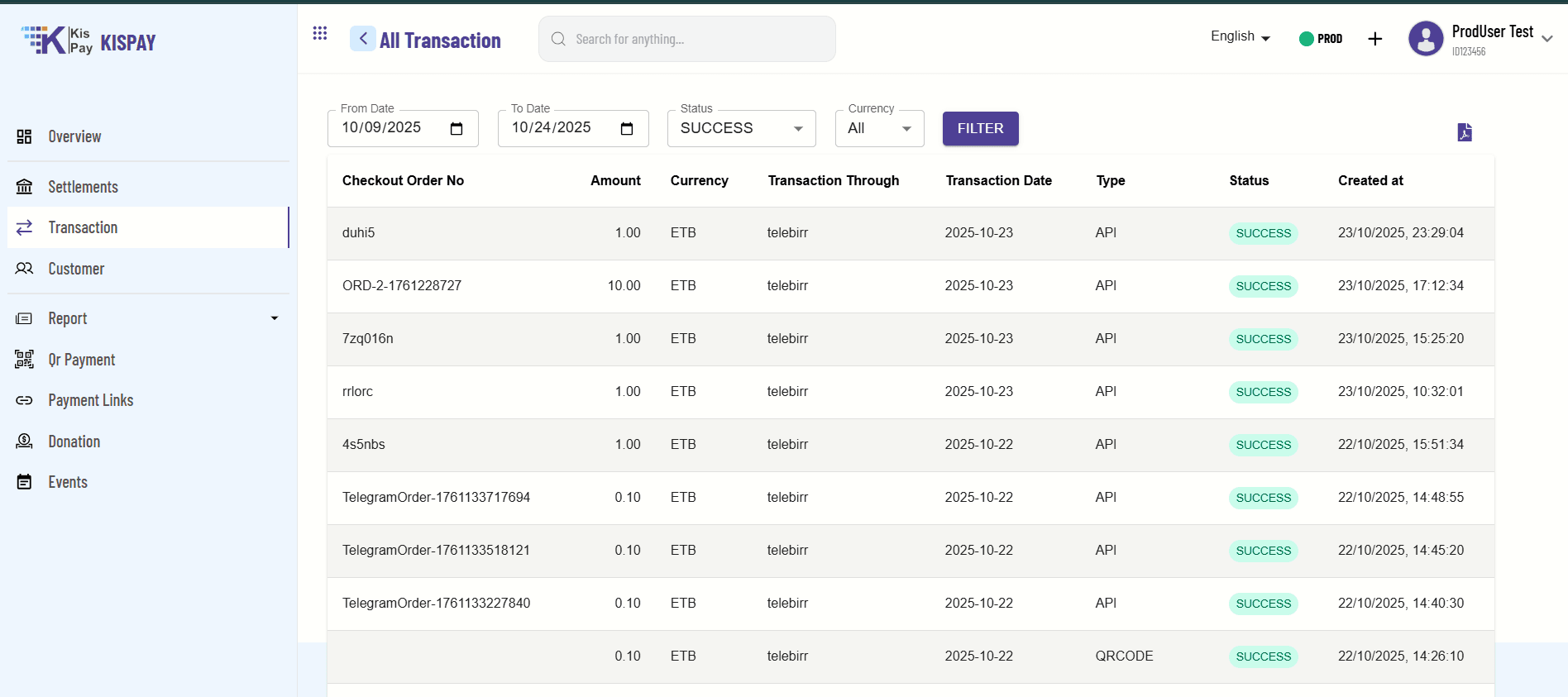
Portal Features
Transaction List View
The portal displays all transactions in a comprehensive table with the following columns:
| Column | Description |
|---|---|
| Checkout Order No | Your custom order/transaction reference number |
| Amount | Transaction amount in the specified currency |
| Currency | Payment currency (ETB) |
| Transaction Through | Payment method used (TeleBirr, CBE Birr, Awash Birr) |
| Transaction Date | Date when the transaction was processed |
| Type | Transaction type (API, QRCODE, etc.) |
| Status | Current transaction status (SUCCESS, FAILED, PENDING, etc.) |
| Created at | Timestamp when the transaction was initiated |
Fetching Transactions via API
For automated systems and integrations, use the Transaction API to programmatically retrieve transaction data.
API Endpoint
GET /api/checkout/txns/get_all_txnsBase URL: https://api.kispay.et
Full Endpoint: https://api.kispay.et/api/checkout/txns/get_all_txns
Authentication
All requests must include your API key in the Authorization header:
Authorization: Bearer YOUR_API_KEYQuery Parameters
| Parameter | Type | Required | Description |
|---|---|---|---|
| startDate | string | Yes | Start date for transaction range (YYYY-MM-DD) |
| endDate | string | Yes | End date for transaction range (YYYY-MM-DD) |
| status | string | Yes | Filter by status (SUCCESS, FAILED, PENDING, etc.) |
| currency | string | Yes | Filter by currency (ETB) |
Example Request
Fetch All Successful Transactions
curl -X GET "https://api.kispay.et/api/checkout/txns/get_all_txns?startDate=2025-10-01&endDate=2025-10-24&status=SUCCESS¤cy=ETB" \
-H "Authorization: Bearer YOUR_API_KEY"Response Format
Success Response (200 OK)
{
  "statusCode": 200,
  "message": "Transactions retrieved successfully",
  "data": [
    {
      "checkoutOrderNo": "ORD-2-1761228727",
      "amount": 10.0,
      "currency": "ETB",
      "transactionThrough": "telebirr",
      "transactionDate": "2025-10-23",
      "type": "API",
      "status": "SUCCESS",
      "createdAt": "2025-10-23T17:12:34.000Z",
      "sessionId": "abc123xyz",
      "transactionId": "txn_1234567890",
      "customerName": "John Doe",
      "customerEmail": "customer@example.com",
      "customerPhone": "0912345678"
    },
    {
      "checkoutOrderNo": "7zq016n",
      "amount": 1.0,
      "currency": "ETB",
      "transactionThrough": "telebirr",
      "transactionDate": "2025-10-23",
      "type": "API",
      "status": "SUCCESS",
      "createdAt": "2025-10-23T15:25:20.000Z",
      "sessionId": "def456uvw",
      "transactionId": "txn_0987654321"
    }
  ],
  "pagination": {
    "total": 50,
    "page": 1,
    "limit": 10,
    "totalPages": 5
  },
  "timestamp": "2025-10-24T06:21:19.716+00:00"
}
Response Fields
| Field | Type | Description |
|---|---|---|
| checkoutOrderNo | string | Your custom order reference |
| amount | number | Transaction amount |
| currency | string | Payment currency (ETB) |
| transactionThrough | string | Payment method (telebirr, cbebirr, awashbirr) |
| transactionDate | string | Date of transaction (YYYY-MM-DD) |
| type | string | Transaction type (API, QRCODE) |
| status | string | Transaction status |
| createdAt | string | ISO 8601 timestamp |
| sessionId | string | Checkout session ID |
| transactionId | string | Unique transaction ID |
| customerName | string | Customer’s full name |
| customerEmail | string | Customer’s email address |
| customerPhone | string | Customer’s phone number |
Transaction Statuses
Understanding transaction statuses helps you handle different scenarios correctly.
| Status | Description | Meaning |
|---|---|---|
| SUCCESS | Payment completed successfully | Transaction is complete, funds confirmed |
| FAILED | Payment failed | Transaction declined or failed |
| PENDING | Payment in progress | Awaiting confirmation from payment provider |
| CANCELLED | Payment cancelled | Customer cancelled the transaction |
| EXPIRED | Session expired | Payment session timed out |
Reports
In the Reports section of the Merchant Portal, you can access a range of reports such as daily, weekly, monthly, and quarterly summaries.
Need Help?
For questions about transaction management and reports:
- Developer Support: developers@kispay.et
- Merchant Portal: https://merchant.kispay.et
- API Documentation: Error Codes Guide
Pro Tip: Use the Merchant Portal for manual reviews and the API for automated reporting and integration with your business systems.